
How to Use Alipay in China as a Foreigner in 2026
Trip.com Travel Offers
Check the current Trip.com travel promotion and read the live offer terms before booking.
View Current Trip.com DealsAffiliate link: Matt China Guide may earn a commission at no extra cost to you.
Last checked: August 31, 2026. This guide distinguishes between payment rules confirmed by Chinese government guidance and account-specific checks that only the Alipay app and your card issuer can show.
Arriving in China without a working payment method can turn a simple taxi ride, convenience-store purchase or train-station snack into a stressful problem. Many international visitors can set up Alipay before arrival and link an overseas bank card. The result still depends on your card network, issuing bank, identity verification, phone number and the merchant’s payment setup.
This guide explains the practical setup process, what may not work, and what to prepare as a backup. It is written by Matt, a China-based local creating practical guides for first-time international visitors.
Short answer: Download the official Alipay app, create an account with your mobile number, complete any requested identity verification, and add an eligible overseas bank card under Me > Bank Cards. Test it before your trip and carry a second payment option.
Do not follow old Tour Pass instructions
Before setting up your account, ignore articles that tell you to download a separate “Alipay International” app, open a Tour Pass, or load money into a 90-day Shanghai Bank prepaid card. Those instructions appear in older visitor tutorials, including an August 2023 iFans article. They describe an earlier product flow, not the current foreign-card workflow used in this guide.
For a first-time visitor, start with the official app named Alipay in the Apple App Store or Google Play. Create your own account, add your own eligible overseas card, and follow only the verification screens that appear in that official app. Do not transfer money to a third party or buy a prepaid card from a person or unofficial website in order to “activate” Alipay.
What you need before setting up Alipay
Prepare:
- A smartphone with access to the official App Store or Google Play.
- A mobile number that can receive verification messages. Keep this number active for the entire trip.
- A valid passport. Keep it available, but do not upload its details anywhere except the official Alipay identity-verification screen.
- An eligible international bank card. Supported networks and features vary by country, card type and issuing bank.
- Your card issuer’s permission for online and overseas transactions.
- A backup plan: a second card, some RMB cash, or another payment method.
China’s official English-language payment guidance says overseas visitors can link international cards, including Visa and Mastercard, to Alipay and WeChat Pay. The same guidance says that no ID information is required for mobile-payment transactions below a certain amount. It also states a US$5,000 single-transaction cap and a US$50,000 annual cap for overseas visitors at the time of publication. The current Alipay app and your card issuer are the final source for your own account, because limits and eligibility can change.
The same government guide says Alipay expanded its service languages to 16 and applies translation within services such as taxi hailing, hotel booking, scenic-spot tickets, public transport and exchange-rate checking. Treat those as useful in-app services, not as a promise that every city, merchant, route or booking will accept your linked card.

Alipay-themed mobile-payment illustration. Source: Shwangtianyuan / Wikimedia Commons, CC BY-SA 4.0.

How to set up Alipay step by step
1. Download the official Alipay app
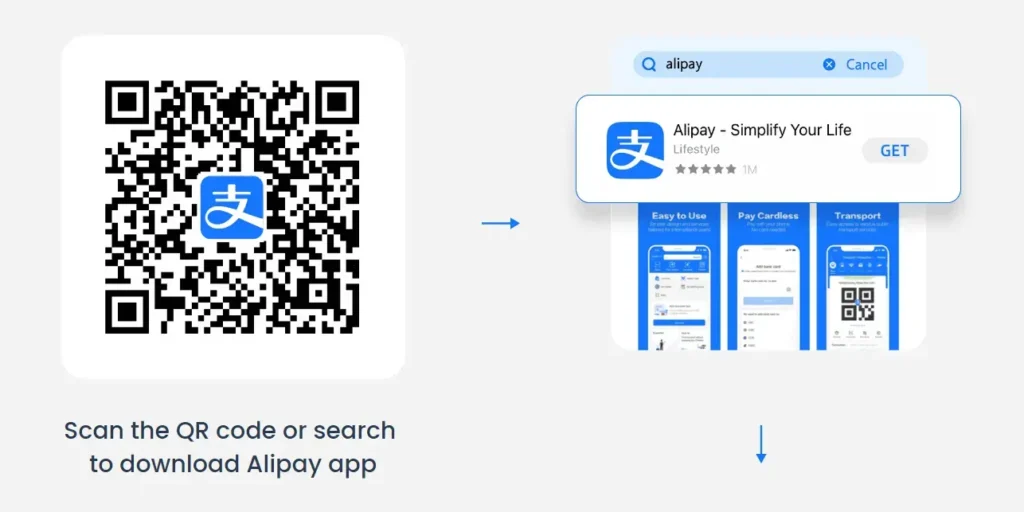
Install Alipay from the official app store on your phone. Search for Alipay and check the publisher before installing. Avoid APK files, unofficial download pages and apps with similar names.
If you are outside China, install and register before departure. This gives you time to solve verification or card problems while you still have access to your bank and mobile operator.
2. Create an account
Open Alipay and choose the sign-up option. Register with a mobile number that you can access during your trip. Follow the verification instructions in the app.
Use your real personal details. Do not use a nickname, a temporary number or someone else’s identity information. If the app asks for nationality or passport details, enter them exactly as shown on your passport.
Your phone number is the sign-in and security channel for this account. Keep that SIM or eSIM active for the whole trip, because a card issuer or Alipay may send a verification message when you add a card or approve a payment.
Do not give a shop, driver, hotel receptionist or online helper the SMS code you receive. A legitimate payment only needs you to confirm it inside your own app or through your own bank’s verification page.
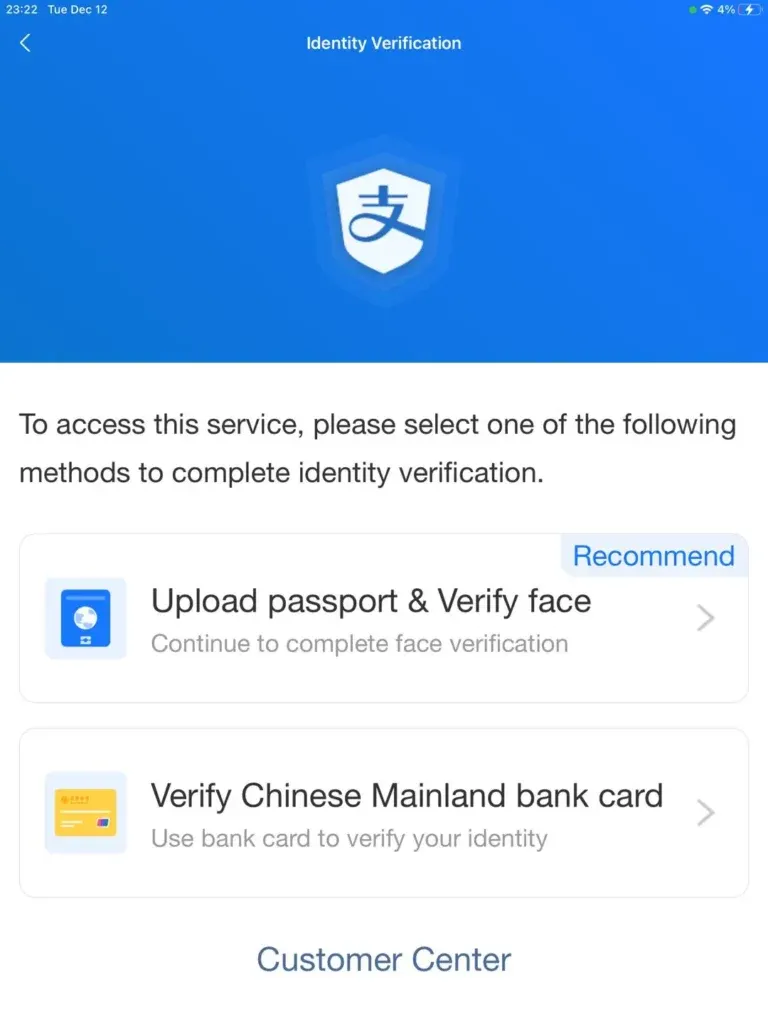
3. Handle identity verification correctly
Do not upload your passport before the official app requests it. The People’s Bank of China says that no ID information is required for mobile-payment transactions below a certain amount. For an account that opens the official Identity Verification screen, use your own valid passport, enter your legal name and passport number exactly as printed, and complete only the steps shown inside Alipay.
Do not send passport photos to a merchant, a driver, a social-media contact or an unofficial support account. A completed registration does not guarantee that every account feature is available.
4. Add your overseas bank card
In the current English app interface, use:
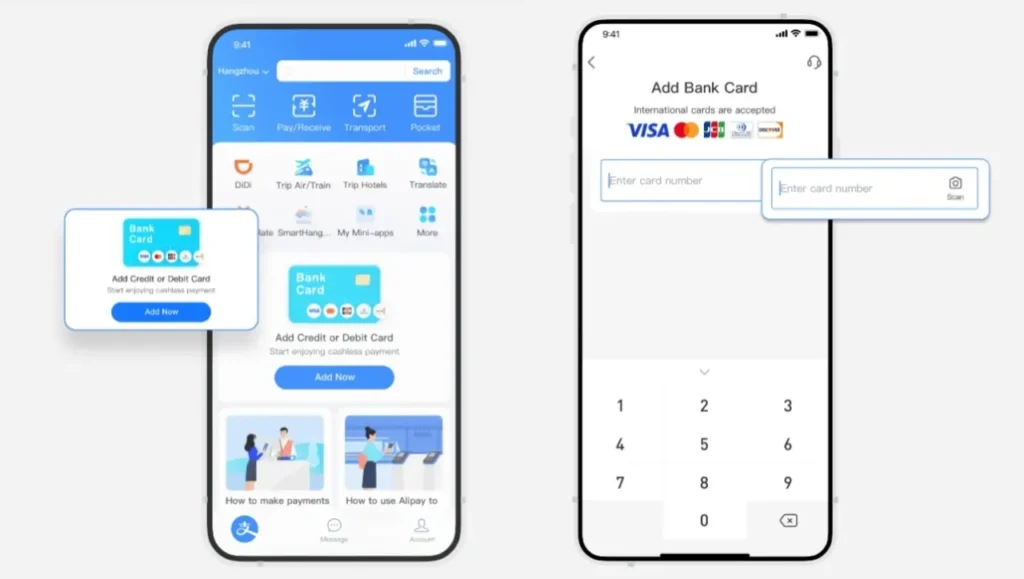
Alipay > Me > Bank Cards > + Add Bank Card
Tap Me in the bottom-right corner, open Bank Cards, then tap the + Add Bank Card button. Enter the card details only in the official Alipay app. Complete the one-time verification sent by your card issuer.
Adding a card and adding money are not the same task. With the current foreign-card route, pay from the card you linked; do not look for an old Tour Pass top-up screen. Alipay, your issuing bank and the merchant decide whether a particular transaction is approved.
If the card cannot be added:
- Confirm that the card number and billing details are correct.
- Check whether your bank allows overseas online transactions.
- Try a different eligible card from another issuer.
- Contact your bank if the transaction is declined.
- Contact Alipay support through the official app.
- Do not repeatedly submit incorrect details.

An Alipay payment terminal. This is an example of mobile-payment infrastructure, not a foreign-card setup screen. Source: BreakdownDiode / Wikimedia Commons, CC BY-SA 4.0.

5. Test the account before you travel
Do not wait until you are standing at an airport counter. Test the account with a small, legitimate payment where available. Check whether the card is shown as linked and whether the app displays a warning or verification request.
A test is useful, but it is not a guarantee that every merchant in China will accept the same payment route. Offline terminals, small vendors, transport systems and online services can have different requirements.
How to pay with Alipay in China
Option A: Scan the merchant’s QR code
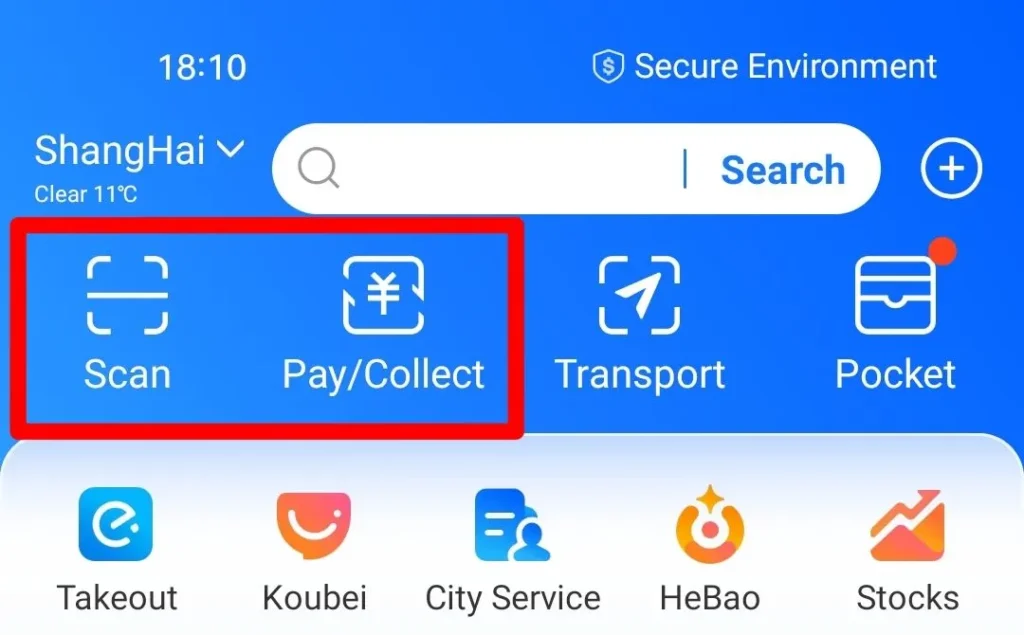
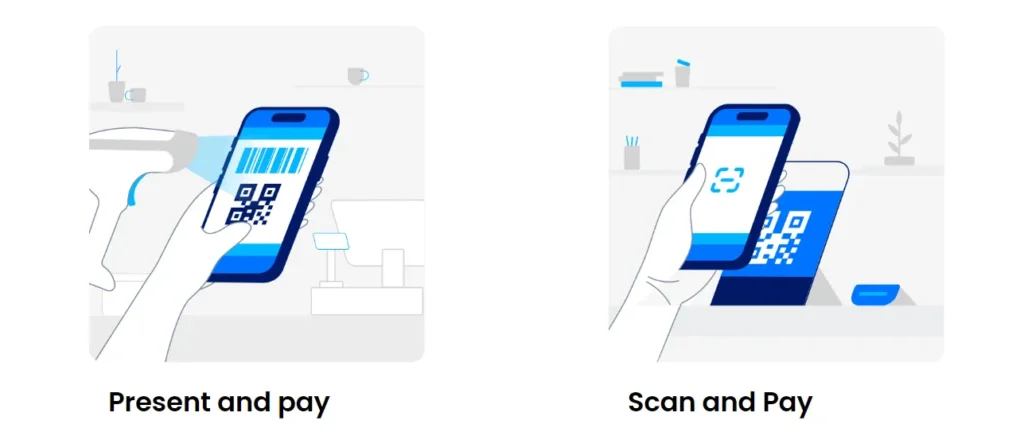
At many shops and restaurants, the merchant displays a payment QR code. Open Alipay, tap Scan, and scan the code. Confirm the merchant name and amount before authorizing payment.
Never scan a random QR code sent by an unknown person. A payment QR code should match the shop or official counter where you are paying.
Option B: Let the merchant scan your payment code
At a staffed checkout, ask the cashier to scan your Alipay payment code. Open the payment-code function in Alipay, keep the phone in your hand, and show it only when the amount and merchant are visible at the counter. Authorize the payment only after you have checked the amount.
The payment code is not a public image. Do not screenshot it, share it in a chat, or let anyone photograph it.

Alipay and WeChat Pay acceptance signs in a shop in Suzhou. Acceptance signs do not guarantee that every overseas card or account will work. Source: Shwangtianyuan / Wikimedia Commons, CC BY-SA 4.0.

Option C: Use eligible transport services
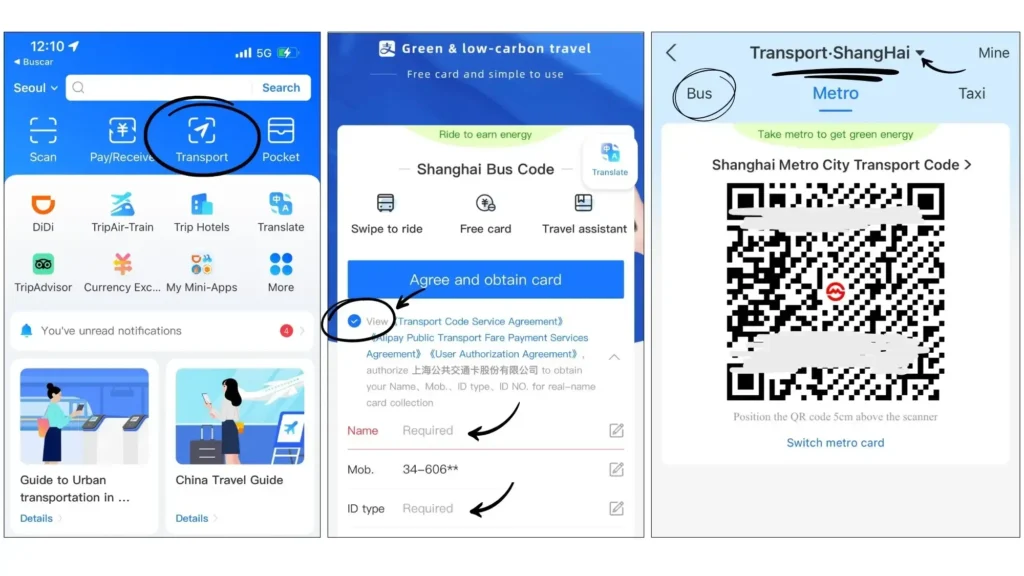
Alipay includes transport features in some Chinese cities, but availability is city-specific. A transport QR code that works in one city may not work in another.
Before relying on it, check the city and transport mode in the Alipay app, confirm whether identity verification is required, and keep a backup option for buses, metro and taxis.
Option D: Use an eligible home e-wallet when you already have one
China’s government payment guide says some overseas visitors can pay by scanning an Alipay QR code with a familiar home e-wallet. It specifically names TrueMoney and Changi Pay as examples accepted by some merchants. This is not a replacement for setting up Alipay: availability depends on your existing wallet, the merchant and the payment route shown at checkout.
Use this option only when you already have the supported wallet in your own name. Do not download a new wallet or move money to a third party because a stranger says it will work in China.

A card and QR-code reader on a Shanghai bus. Confirm the current transport and payment rules for your city in the app before traveling. Source: Shwangtianyuan / Wikimedia Commons, CC BY-SA 4.0.

What may not work
Alipay is useful, but it is not a universal replacement for every Chinese payment method.
Peer-to-peer transfers may be different
A payment to a registered shop is different from sending money to a private individual. Some account types or overseas cards may not support transfers, red packets or other person-to-person functions.
Do not rely on peer-to-peer transfers unless the current rules explicitly show that your account supports them.
Some merchants may still decline an overseas card
A card linked to Alipay may work at one merchant and fail at another. Possible reasons include the merchant’s payment account, card issuer controls, network coverage or a temporary service issue.
For important purchases, keep a backup card and a small amount of RMB cash. For hotels, trains and attractions, confirm the payment method and refund policy before committing.
A card logo is not the same as a successful linked-card payment
The government guide says a bank card can be accepted where the corresponding payment-organization logo is displayed at the checkout counter. That rule is useful for paying by the physical card, but it does not guarantee that your overseas card will work through every Alipay merchant flow. When an Alipay payment fails, use your backup card at a counter that displays its card-network logo, or use cash.
Internet and phone access matter
You need a working phone and internet connection to authenticate and use many app functions. Prepare mobile data or Wi-Fi before leaving the airport. Save your hotel address in Chinese and English so you can ask for help if your phone is temporarily offline.
Read our China travel start guide before departure. A dedicated payments and travel apps guide will be added here after it is published.
Common Alipay problems and fixes
| Problem | What to try |
|---|---|
| Card will not link | Check card details, overseas transaction settings and issuer declines; try another eligible card. |
| Verification does not complete | Use accurate passport details and the official in-app support channel. |
| Payment is declined | Confirm the amount and merchant, retry once, then use a backup card or cash. |
| QR code will not scan | Improve lighting, ask the merchant for another code, or use the payment-code option. |
| App shows a limit or risk warning | Follow the in-app instructions; do not create duplicate accounts to bypass a control. |
| Refund is unclear | Ask the merchant how the refund will be returned and keep the receipt or transaction record. |
Fees, exchange rates and cash backup
Do not publish or rely on a blanket claim that Alipay charges “zero fees” for every foreign-card payment. The amount you pay can include card-issuer foreign-transaction fees, exchange-rate conversion or account-specific charges. Before departure, read your bank’s foreign-purchase fee and currency-conversion terms. At payment, check the amount shown in RMB and the final confirmation screen before authorizing it.
RMB cash remains a legitimate backup. The government guide says foreign visitors can withdraw RMB at ATMs that display the logo of the corresponding card organization. Carry enough for a failed app payment, a small shop or a transport problem, but do not carry more than you can keep secure.

An NFC payment terminal displaying Alipay support. Available payment methods depend on the terminal, merchant and your account. Source: HualinXMN / Wikimedia Commons, CC BY-SA 4.0.

A practical payment backup plan
Use this three-layer setup:
- Primary: Alipay linked to an eligible overseas card.
- Secondary: a second card from a different network or issuer.
- Emergency: a small amount of RMB cash and your accommodation details saved offline.
Before leaving home, confirm that your bank will not block overseas transactions, save its international support number, keep your passport secure, test your phone data plan, save booking confirmations offline, and check foreign-exchange fees.

Passengers enter or exit Wuhan Metro using QR codes. City transport systems are separate from general merchant payments and may have their own rules. Source: Painjet / Wikimedia Commons, CC BY-SA 4.0.
.jpg)
FAQ
Can foreigners use Alipay in China?
Many foreign visitors can register for Alipay and link an eligible overseas bank card. Support depends on the current app rules, your country, card and account verification. Test your own account before traveling.
Can I use Visa or Mastercard with Alipay?
China’s official English-language payment guidance lists Visa and Mastercard among international cards that can be linked to Alipay and WeChat Pay. Availability can vary by issuing bank, card type, account status and merchant.
Should I use Tour Pass or a 90-day prepaid card?
No. Do not use an old tutorial as your setup checklist. Start with the official Alipay app and link your own eligible overseas card. A 2023 third-party guide may still show Tour Pass and a Shanghai Bank prepaid-card flow, but that is not the route this 2026 guide instructs readers to use.
Do I need a Chinese bank account?
Not necessarily for every visitor setup. Some international visitors can link an overseas card, but available features may differ from those available to a China-issued account. Do not assume that transfers or every online service will work.
Can I pay every Chinese merchant with Alipay?
No payment method works everywhere. Large stores, hotels and tourist services may have different acceptance rules from small vendors or transport systems. Carry a backup option.
Is Alipay better than WeChat Pay for a tourist?
Neither is universally better. The best choice is the service that successfully verifies your account and card. Consider setting up both when possible.
Final checklist
- Alipay is installed from an official app store.
- Your account uses an accessible phone number.
- You will use your passport only on the official Alipay identity-verification screen, if that screen opens for your account.
- An eligible overseas card is linked and tested.
- You have a second card or RMB cash.
- You know how to reach official support.
- You have checked the latest rules and limits.
For official background, read the Chinese government’s English-language payment guide for overseas visitors. Government guidance and app features can change, so check the source again before publishing. This article also reviewed an April 2026 Trip.com guide for traveller-facing setup topics; Trip.com is not an official Alipay source. Its screenshots and images are not reproduced here because no reusable licence is stated.
Affiliate disclosure: Some links on Matt China Guide may be affiliate links. If you make a qualifying purchase through one of these links, I may earn a commission at no extra cost to you. This article does not guarantee card approval, payment acceptance, entry to China or any particular refund result.
About Matt China Guide
I am Matt, a Chinese local writing practical China travel guides for people visiting the country for the first time. My role is to translate the local systems that visitors meet in real life – payments, rail travel, apps, station rules and booking steps – into clear English actions before they become a problem at a counter or gate.
I do not ask readers to trust a vague travel tip. I check the official source available for a key action, link it in the article, and show the date I checked it. When a result depends on a traveller’s passport, bank, account status, city or merchant, I say that directly instead of presenting it as a universal rule.
This is the standard behind Matt China Guide:
- Official rules before opinions: I link the government, platform or transport source that supports a key action.
- Exact steps before generic advice: I explain what to prepare, what to select, what document to carry, and what to do when the normal route fails.
- Local context without invented claims: I explain why a passport match, payment confirmation or booking detail matters, but I do not promise a result that only the platform, bank or authority can approve.
- Updates are part of the guide: Every time-sensitive post carries a visible “Last checked” date. When an official rule changes, I update the guide rather than leaving an old workaround online.
My goal is simple: help you arrive prepared, make the right decision once, and spend your time in China travelling instead of untangling avoidable problems. Read the China travel start guide to plan the rest of your first trip.

About Matt China Guide
I am Matt, a Chinese local writing practical China travel guides for people visiting the country for the first time. My role is to translate the local systems that visitors meet in real life – payments, rail travel, apps, station rules and booking steps – into clear English actions before they become a problem at a counter or gate.
I do not ask readers to trust a vague travel tip. I check the official source available for a key action, link it in the article, and show the date I checked it. When a result depends on a traveller’s passport, bank, account status, city or merchant, I say that directly instead of presenting it as a universal rule.
This is the standard behind Matt China Guide:
- Official rules before opinions: I link the government, platform or transport source that supports a key action.
- Exact steps before generic advice: I explain what to prepare, what to select, what document to carry, and what to do when the normal route fails.
- Local context without invented claims: I explain why a passport match, payment confirmation or booking detail matters, but I do not promise a result that only the platform, bank or authority can approve.
- Updates are part of the guide: Every time-sensitive post carries a visible “Last checked” date. When an official rule changes, I update the guide rather than leaving an old workaround online.
My goal is simple: help you arrive prepared, make the right decision once, and spend your time in China travelling instead of untangling avoidable problems. Read the China travel start guide to plan the rest of your first trip.